Option 1: Webmail Filters
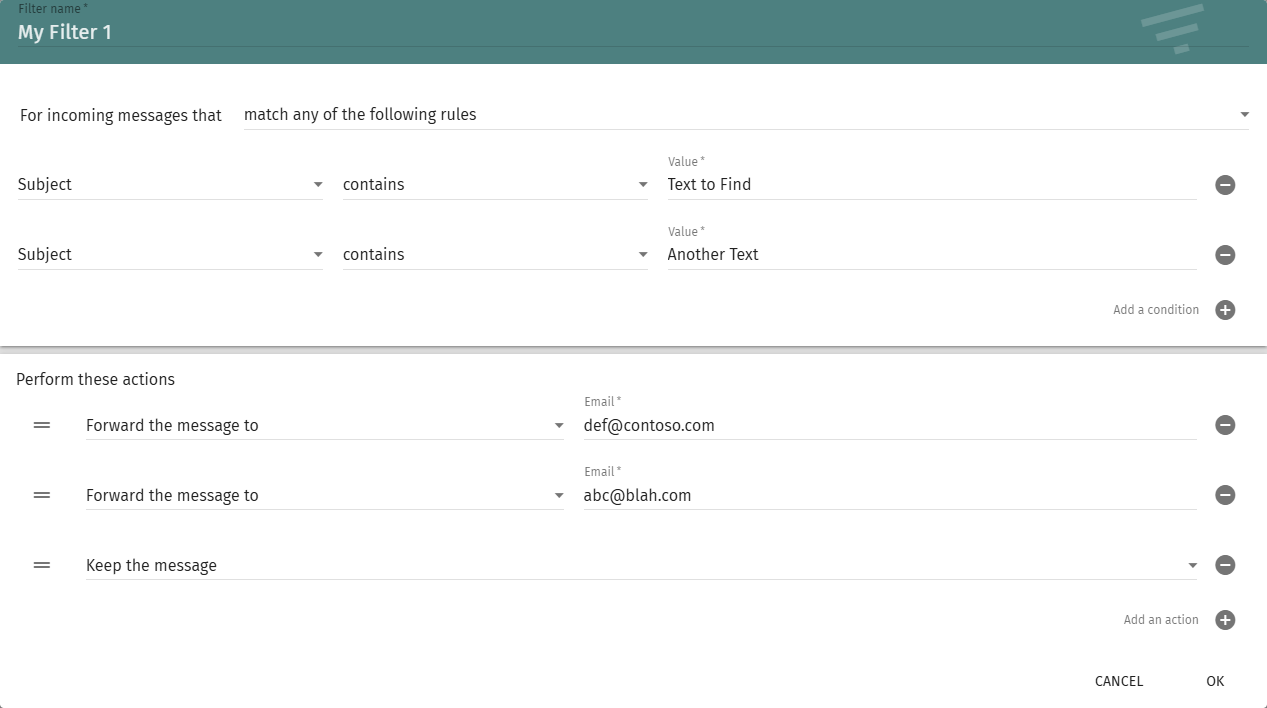
When using the webmail, go to Settings (top left) -> Mail (left menu) -> Filters. Click on Create Filter and fill out your options. You must also add an action called Keep the message if you want the message to be delivered to the inbox. After clicking OK, you must also click the save icon in the top right for all your settings to be saved.
Option 2: Sieve Filter
In the Mailcow admin, go to E-mail -> Configuration -> Filters -> Add Filter.
Username: Select the mailbox you want this filter to work on
Filter type: Prefilter
Script: Use this script to forward all e-mails matching the regex to the e-mail in the script
require ["regex", "copy"];

# The regex checks the Subject.
# "i;ascii-casemap" makes it case-insensitive (Matches "Order", "ORDER", "order").
# We use redirect :copy to ensure the original message stays in your inbox.

if header :regex :comparator "i;ascii-casemap" "Subject" "(text1|blah|another)" {
    redirect :copy "sendacopy@contoso.com";
}

# Note: We do NOT use the "stop;" command.
# This allows the email to continue to the standard Inbox delivery
# or be processed by further rules.
Was this article helpful?
That’s Great!
Thank you for your feedback
Sorry! We couldn't be helpful
Thank you for your feedback
Feedback sent
We appreciate your effort and will try to fix the article